Tuesday Tip: Wishpot wish list widget!
 We have a fun new profile feature to tell you about! We have partnered with Wishpot.com – a free social shopping service that makes it easy to save and share interesting things you find in stores and online – to provide an animated, graphical wish list widget for your Swap-bot profile page. The widget is a fun (and totally optional) way to add a little spice to your profile page while letting your partners know a little more about you.
Wishpot is a free website that allows you to easily create wish lists, registries, or collections of cool things you find online. You can learn more about using Wishpot here. Once you have created a Wishpot account, you can add a graphical wish list to your Swap-bot profile page.
To add the Wishpot widget to your profile, click on the “Edit Profile” option either on your profile page or in the drop down under the Profile link at the top of all Swap-bot pages. On the Profile Edit page you will now find a “Add-ons” link. Click there to find the Wishpot widget option. Below is a screen shot of what you will see on the Add-ons screen:
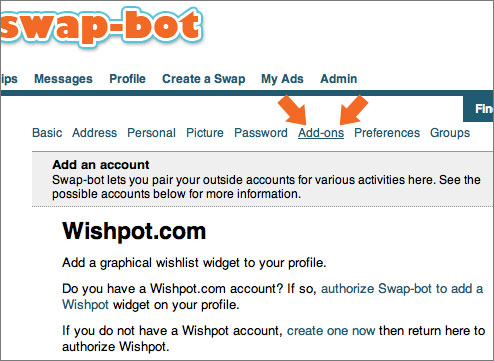
You must authorize Swap-bot to access your Wishpot account by logging into Wishpot.com via the ” authorize Swap-bot to add a Wishpot” link. You will then be re-directed back to Swap-bot to select which of your wish lists you would like to share on your Swap-bot profile page. You could share you general wish list just for fun, or you could create a special swap-specific wish list just for use on Swap-bot. Wishpot allows you to create multiple different lists and make them private or public as you choose. However, the list and items you display on Swap-bot must be marked as public in order for your widget to work.
Here is what my Wishpot wish list widget looks like:
<img style=”visibility:hidden;width:0px;height:0px;” border=0 width=0 height=0 src=”http://counters.gigya.com/wildfire/IMP/CXNID=2000002.0NXC/bT*xJmx*PTEyNDY4ODkxNTAwMzgmcHQ9MTI*Njg4OTE3NzAyOSZwPTE5MDI1MSZkPSZnPTEmdD*mbz*1NWU3YTgzZmI3ODc*ZDBkOTk3ZTk5MTIwODYyMjI2YiZvZj*w.gif” />
One activated, your Wishpot widget will be automatically placed at the very bottom of the text section of your profile page, just above your ratings. Your widget will update automatically any time you add a new item to your Wishpot list. (Wishpot makes it super-easy to add items to your lists with their browser bar button.) You can remove your widget at any time by going back to the Add-ons page in the Profile Edit screen and clicking on the “Deauthorize Wishpot and remove widget from profile” link. Because this is a brand new feature, there may still be a few kinks to work out. Let me know if you have any trouble or questions. In the future we hope to add more widget options that integrate your favorite online services with your Swap-bot account.